Modules
Managing modules and submodules
There are multiple modules available, split into managing modules and submodules. Structurally, both are similar, but they have different permissions and concerns.
A managing module can hold a physical field variable and they usually do so. This variable is also present within the core code the managing module is tasked with writing into that variable and maintaining it during the simulation. Further, a managing module can have an arbitrary amount of submodules, which perform some task related to the maintanence of the field variable.
Submodules don’t have writing permission into the core code, only reading permissions. So they need to communicate their results to a mananging module in order for them to affect the simulation. They themselves can also have an arbitrary number of submodules. This allows for a large reduction in duplicate code, as for example equations that perform the same operations on different materials can be implemented in a hirarchical way. This is illustrated in the following picture.
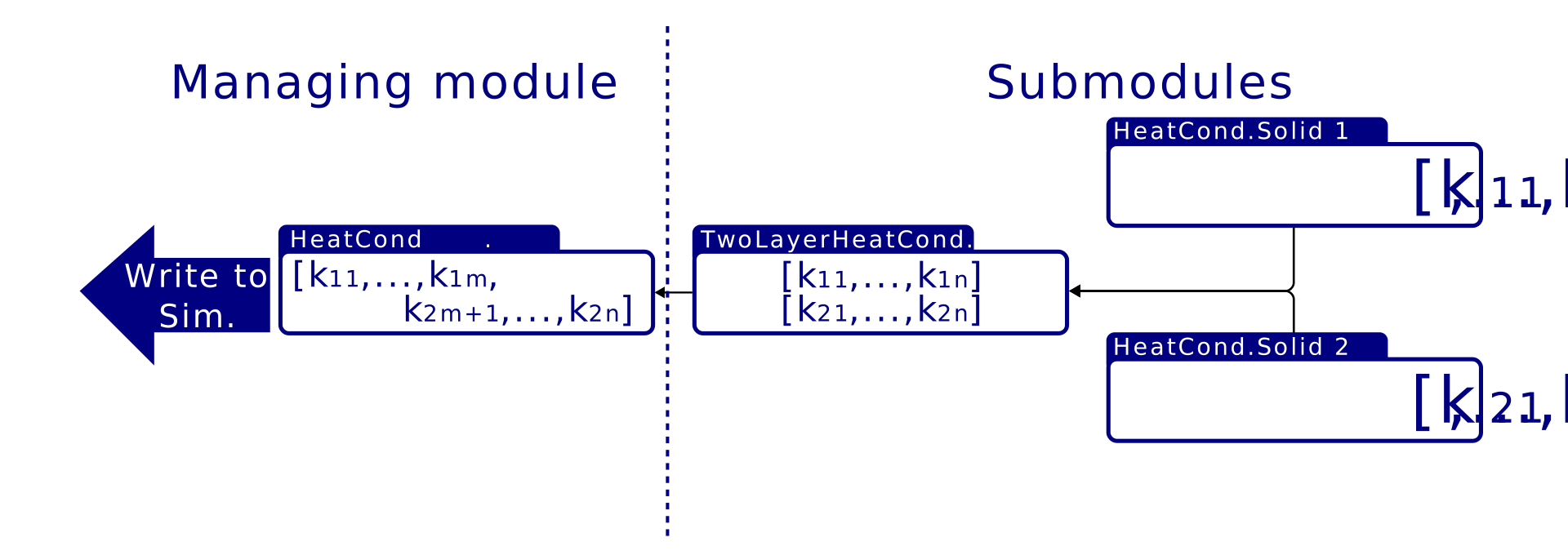
Module-insertion-points
Module-insertion-points (MIPs) are the points in the core code, where the module framework is invoked. This means that at these points, modules can be run and interact with the simulation environment. In the default configuration of MoCSI, there are 5 MIPs, which are also illustrated in the following picture.
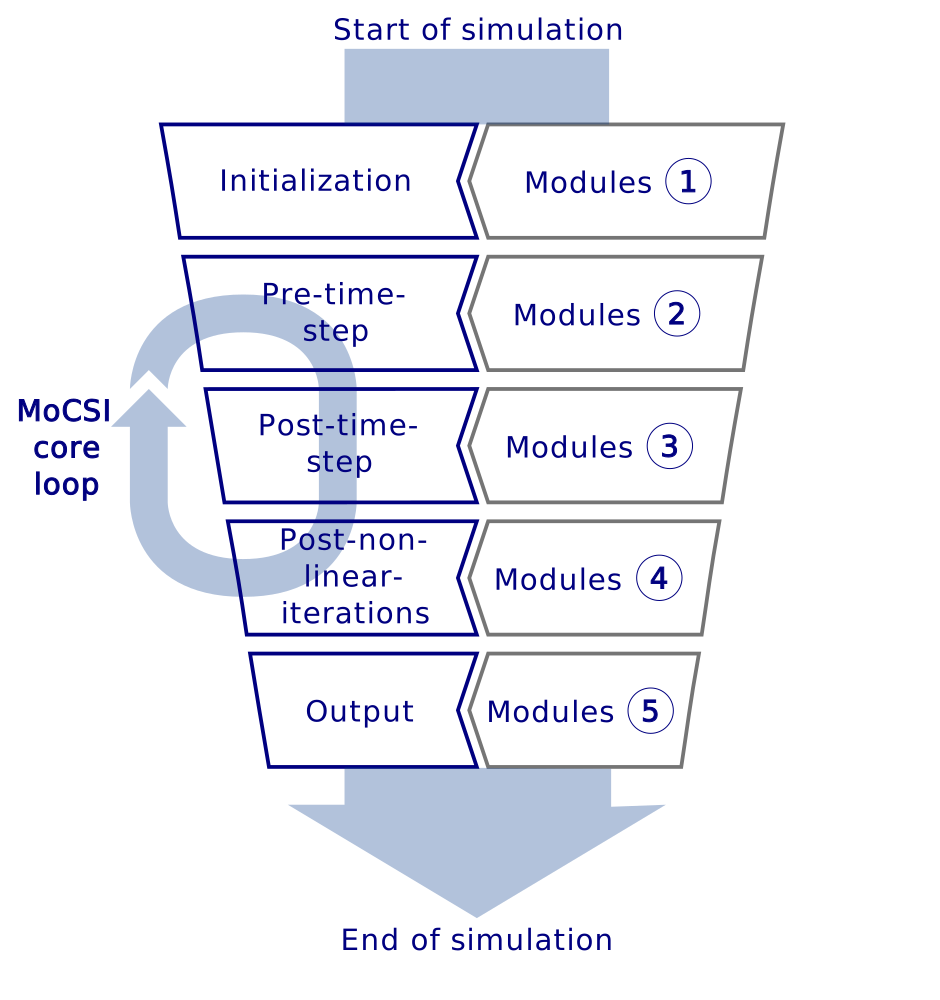
These MIPs are Initialization (InitChain), Pre-time-step (PreTimeStepChain), Post-time-step (PostTimeStepChain), Post-non-linear-iterations (PostNonLinIterChain) and Output (OutputChain). The names within the brackets are how they appear within the code.
Initialization is run once directly after the grid has been build and before entering the time stepping loop.
Pre-time-step is run at the start of each time step, before anything else was calculated
Post-time-step is run after the temperatures have been updated
Post-non-linear-iterations is run after the time step has converged and was accepted. In the case of no internal iterations (so no non-linear components within the code) then this is equivalent to the Post-time-step MIP.
Output is run directly before exiting the simulation environment.
Each module can be inserted into each MIP and have different submodule configuration. Since each module also has a corresponding function to each MIP, it can also perform different jobs during different MIPs. This offers a great flexibility and can be used to build complex applications within the module framework.
Working with modules
The modules infrastructure initializes all modules which are
Present within the “modules” folder
Loaded within module_factory.cpp for the employed simulation data type (default: double)
if both of these are true, then the corresponding module will be registered and set up (which usually entails adding their field variable to the simulation for managing modules). If a module is registered, it can be used within the module structure. To actually tell the code to use a module, you need to specify it within that modules .ini file (which can be found within the “ini_files” folder). Managing modules have a “chain_insertion” parameter, where MIPs can be named and the module will automatically be loaded into the specified MIPs. Furthermore, each module has a “submodules” parameter, where submodules can be specified that should be loaded into that modules chain, so which will get executed before their supervising module. This way, module chains can be build up and each gets executed starting from the deepest submodule up to the managing module. If a module needs a different one within the same MIP to be run first, you can do so by specifying it in the “dependencies” parameter. This parameter holds all the names of the modules that the current module is dependent on and MoCSI is trying to load them into the MIPs in a way that resolves all dependencies and throws an error if there are missing or cyclical ones.
Current modules
Following is a list of all currently available modules.
Albedo
Submodules |
Description |
|---|---|
— |
Bolometric Bond albedo for each facet |
|
Constant user supplied value |
Density
Submodules |
Description |
|---|---|
— |
Bulk density of all elements |
|
Const. literature values by asteroid type |
|
Constant user supplied value |
|
Const. literature values by asteroid type (Gundlach & Blum 2013) |
Emissivity
Submodules |
Description |
|---|---|
— |
Emissivity for each facet |
|
Constant user supplied value |
FluxSmoothingTool
Submodules |
Description |
|---|---|
— |
Dynamic time step reduction (Schörghofer & Khatiwala 2024) |
HeatCapacity
Submodules |
Description |
|---|---|
— |
Specific heat capacity of all elements |
|
Constant user supplied value |
|
Const. literature values by asteroid type (Opeil et al. 2010) |
HeatConductivity
Submodules |
Description |
|---|---|
— |
Bulk thermal conductivity of each element |
|
Constant user supplied value |
|
Model description of Maxwell (1873) |
|
Merges two thermal conductivities at given depth |
|
Const. literature values by asteroid type (Gundlach & Blum 2013) |
|
Model description of Gundlach & Blum (2013) |
HeatSource
Submodules |
Description |
|---|---|
— |
Additional heat sources/sinks for each element |
|
Constant user supplied value |
HeliocentricDistance
Submodules |
Description |
|---|---|
— |
Distance between the Sun and the target |
|
Constant user supplied value |
|
Distance calculated through given SPICE kernels |
OutputCsvTool
Submodules |
Description |
|---|---|
— |
Saving field values while sim. still running |
RuntimeProgressTool
Submodules |
Description |
|---|---|
— |
Outputs current simulation progress |